September 20-21, 2025
EXERCISE, EXERCISE
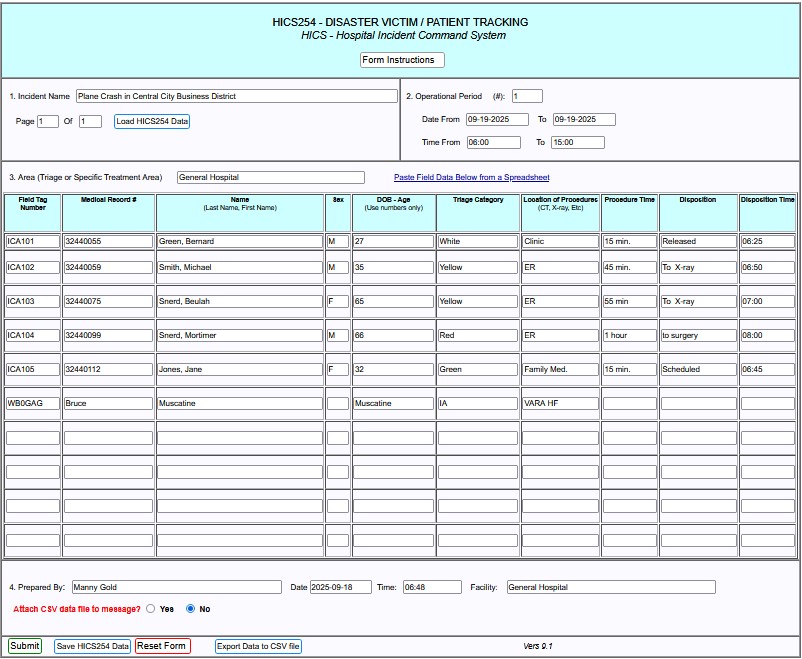
This week's form is HICS254 - DISASTER VICTIM / PATIENT TRACKING.
You are at the hospital where the injured are taken after a plane prash in Central City's Business District.
You are given a spreadsheet to send to the regional hospital.
Start a new message and in Select Templates, select Standard Forms > HICS Forms >
HICS 254 Patient Tracking.
- 1. Incident Name, enter Plane Crash in Central City Business District
Page 1 Of 1
- 2. Operational Period
- (#): enter 1
- Dates From and To, enter 09-19-2025
- Time From, enter 06:00
- To, enter 15:00
- 3. Area, enter General Hospital
Download this Spreadsheet and open it.
Click "Paste Field Data Below from a Spreadsheet" and copy and paste the contents of the downloaded spreadsheet.
Click the "Parse Data" button. This should fill in the report body.
In the next line, enter your
call sign, first name, city or town, county, state, mode
(Winlink HF, VARA FM, VHF packet, etc.), skipping the "Sex" column.
4.
- Prepared By: enter Manny Gold
- Click boxes for Date and Time
- Facility: General Hospital
Attach CSV data file to message? select No unless using PAT, then select Yes.
Here's a filled in example.