August 2-3, 2025
EXERCISE, EXERCISE
This weekend we will visit the propogation forecast in Winlink Express for selecting an HF channel.Forecasts are not included for Vara FM due to the line of sight characteristics of VHF and up.
Techniciams can use 10 meters.
WaAD and PAT do not appear to have the forecasts. A submission is still welcome!
Start a new message without a Template.
Open a Vara HF session. If you do not have a callsign in the left box, lick Channel Selection and add one.
Now click Forecast. You be shown a forecast for that callsign. Here are 2 examples. Click each to see it full size:
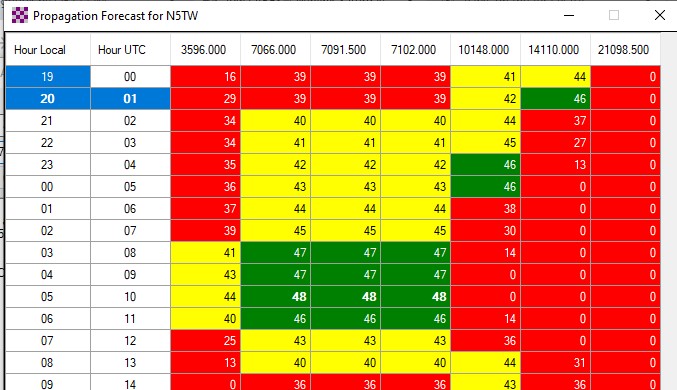
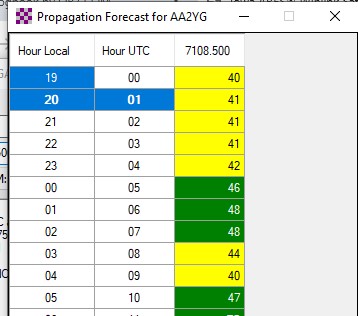
As you can see, each RMS will have a custom range of frequencies and propagation to it will change by the hour!
If you choose, you can grab a screenshot and attach it to you submission. That can be slow to send!
[Shift]+[Ctrl]+[s] will open the screenshot tool (Windows 10 or 11 for sure). (Attaching is a separate exercise.)
call sign, first name, city or town, county, state, mode (Winlink HF, VARA FM, VHF packet, etc.)
2 letter state abbreviation and no parentheses, please! If using more than one bnd for a mode, indicate it:
(Winlink HF 30M, Winlink HF 10M, VARA FM 2M, etc.)
In the message composition window, make sure "Send As:" is set to Winlink Message.
Check "Request message receipt" if you wish a confirmation message.
Set "To:" to WB0GAG or IAWINLINKSAT. Add any others you would like to receive the message.
Set "Subject:" to Iowa Winlink Weekend
When you are satisfied with the message, click "Post to Outbox".
Send as normal, using as many HF, VHF and up bands and modes as you like. If you have no radio capability yet, use telnet.